Design Custom Miniature Bases from Your Browser—Introducing Base Crafter
Ever stared at a killer miniature and thought, "This deserves better than a plain black base"? We've been there too. The base of your mini isn't just where it stands—it's the foundation of your entire battlefield narrative. That's why we built Base Crafter: the browser-based tool that lets anyone (yes, even you) design jaw-dropping custom bases without needing a PhD in 3D modeling.
Why Your Minis Deserve Better Bases
Let's be real—you've spent hours painting every tiny detail on your miniature. You've blended, highlighted, and weathered until your eyes hurt. Then you plop that masterpiece onto... a plain black disc? Talk about anticlimactic.
Custom bases don't just elevate your mini physically; they complete the story you're telling. That space marine deserves to stand triumphantly on alien terrain. Your wizard should be conjuring spells atop ancient ruins. Your dwarf berserker belongs on craggy mountain stone, not a flat circle.
But until now, creating custom bases meant either:
Learning complex 3D modeling software
Paying someone else to design them
Settling for generic, mass-produced options
Physically crafting them with mixed results
None of these solutions were particularly quick, easy, or budget-friendly. That's where Base Crafter changes the game.
Design in Your Browser—No Software Required
Base Crafter isn't just another 3D modeling tool, it's specifically built for tabletop gamers who want amazing bases without the headache. The entire design process happens right in your browser. No downloads. No installations. No system requirements to worry about.
Whether you're on a Mac, PC, or even a decent tablet, if you can open a browser, you can design professional-quality bases. This means you can work on your designs anywhere—during lunch breaks, while watching TV, or waiting for paint to dry on your latest mini.
The best part? We've stripped away all the complexity of traditional 3D modeling. There's no need to understand vertices, polygons, or complex geometric operations. Base Crafter uses intuitive controls and pre-built elements that anyone can master in minutes.
How Base Crafter Works
Creating your perfect base is refreshingly straightforward:
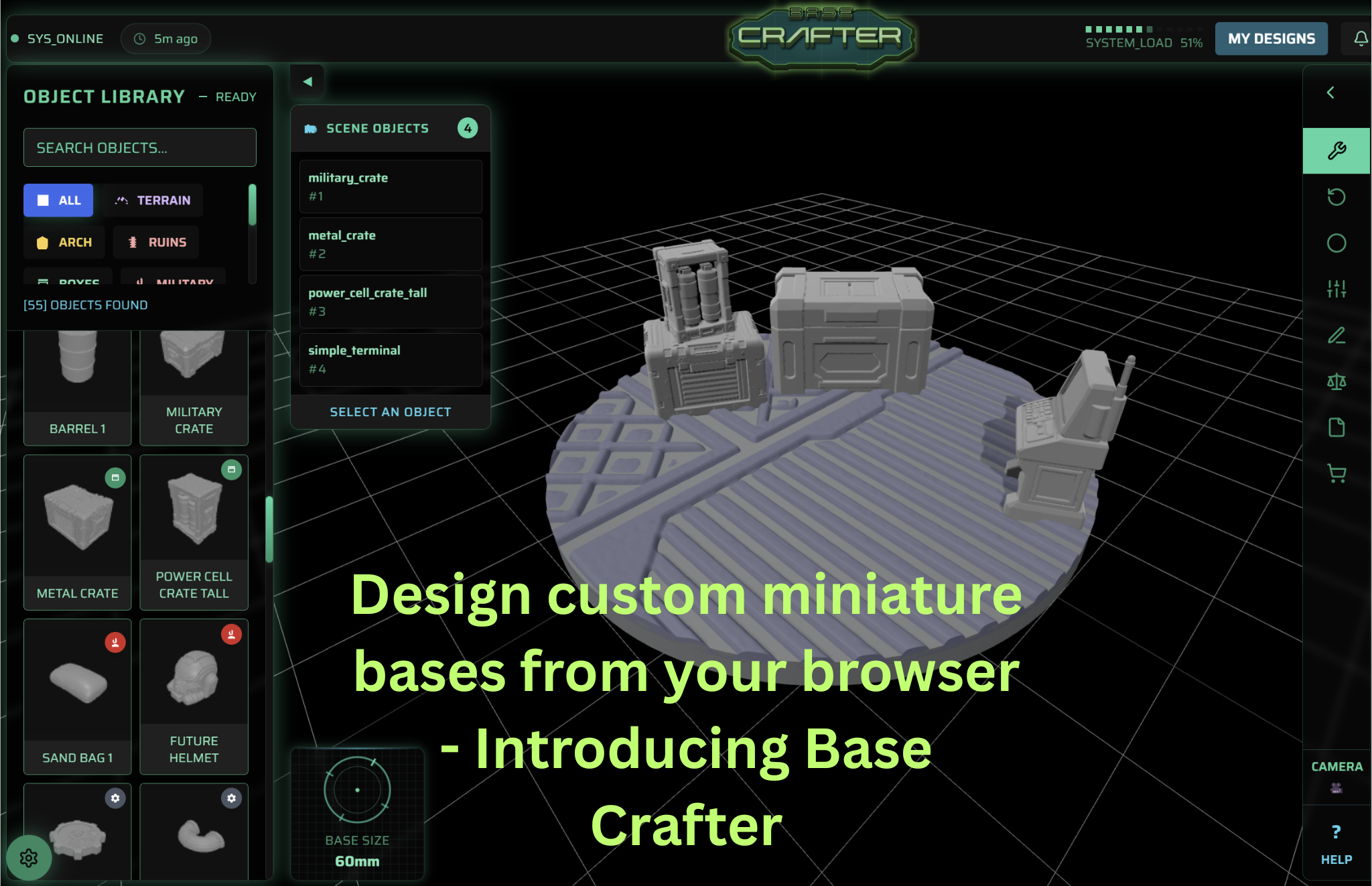
Choose Your Base Size - Start by selecting the diameter that matches your miniature's requirements (25mm, 32mm, 40mm, and other standard sizes are all supported).
Select Your Base Texture - Begin with a plain base, or one of our expanding list of pre built textures.
Add Terrain Elements - Drag and drop rocks, plants, rubble, planks, skulls, vegetation, and dozens of other elements onto your base.
Customise Everything - Resize, rotate, and position elements exactly where you want them. Create height variation, interesting textures, and compelling compositions.
Preview in 3D - Rotate and examine your creation from every angle to ensure it looks perfect.
Download Your STL File - Once you're happy with your design, purchase and download the ready-to-print STL file.
From there, you can print your base at home on your own 3D printer or send the file to a local or online printing service. Either way, you get a completely unique base that perfectly complements your miniature.
Features That Make Base Crafter Special
Designed for Gamers, Not 3D Artists
Unlike generic 3D modeling software, Base Crafter was built specifically for tabletop gaming. Every feature, every design element, and every template was created with miniature bases in mind. We've optimised everything for printability too, so you'll never design something that looks great on screen but fails to print properly.
Expanding Element Library
Our constantly growing library includes many terrain elements, all designed to the scale of popular tabletop games. From sci-fi industrial elements to fantasy ruins, desert wastelands to lush jungle floors—we've got pieces to match any setting or faction.
Real-Time Feedback
See exactly how your base will look as you build it. Our 3D preview updates in real-time, so there's no guesswork involved.
Print-Ready Output
Every STL file from Base Crafter is optimised for 3D printing right out of the gate. We've done the hard work of ensuring proper wall thickness, eliminating non-manifold edges, and all those other technical considerations that can ruin a print.
The exception to this is the Cut To Base feature, this is experimental and may cause holes.*
Perfect for Every Skill Level
Whether you're new to the hobby or a veteran with decades of gaming experience, Base Crafter meets you where you are.
For Beginners: Start with our pre-designed templates and make simple modifications. Even with minimal changes, you'll end up with a base that looks far more impressive than standard options.
For Experienced Hobbyists: Combine elements in complex ways, create multi-level designs, and craft truly unique scenes that tell a story and showcase your creativity.
For Competitive Players: Quickly design functional bases that enhance your miniature's presence while ensuring they remain tournament legal regarding size and height restrictions.
Inspiration for Your Next Base Design
Still wondering what's possible with Base Crafter? Here are some popular themes our users love:
Urban Warfare - Broken walls, bricks, skulls, and debris for that perfect dystopian battlefield look.
Ancient Ruins - Cracked stone flooring, fallen columns, and mystical runes to set the stage for fantasy adventures.
Alien Worlds - Strange vegetation, crystalline formations, and otherworldly textures for sci-fi settings.
Forest Floors - Combine mushrooms, rocks, tree stumps, and plants for naturalistic woodland scenes.
Technical Bases - Grating, pipes, control panels, and mechanical elements for industrial or spaceship environments.
Getting Started Is Easy
Ready to elevate your miniatures with bases that truly do them justice? Here's how to get started:
Visit our designer page to try the tool.
Check out our features overview to see everything Base Crafter can do.
When you're ready to start creating your own designs, explore our pricing options.
Stop Settling for Boring Bases
Your meticulously painted miniatures deserve better than generic bases. With Base Crafter, creating custom, professional-quality bases is finally accessible to everyone—regardless of your 3D modeling experience or technical skills.
Design directly in your browser, download your STL file, and bring your vision to life through the 3D printer of your choice. No software to learn, no complex workflows to master—just an intuitive tool that lets your creativity shine.
Visit
Base Crafter today and discover how easy it can be to give your miniatures the bases they deserve.